The basics
Appointment reminders: what to send, when to send it and how to automate it
An appointment reminder is a short message that tells a client when and where their booking is and gives them one easy way to confirm, move or cancel it. This guide covers what to put in one, when to send it, how many to send and the three ways to send them, from a phone in your pocket to fully automated two-way texts.
What is an appointment reminder, and when should you send one?
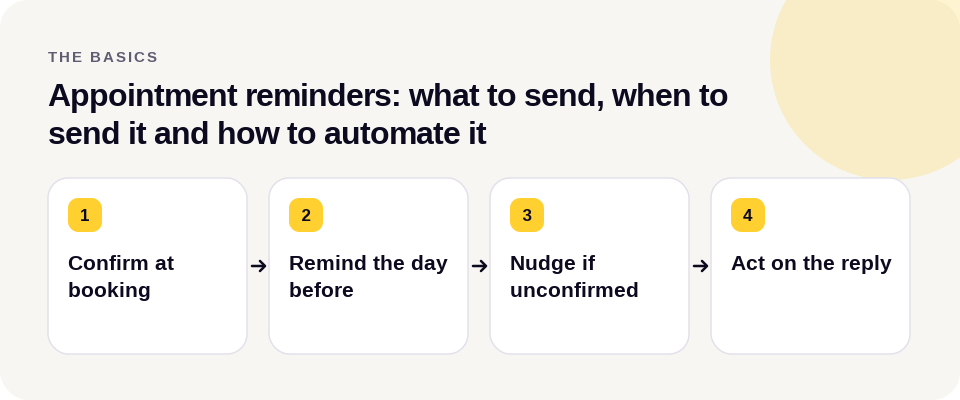
An appointment reminder is a short message before a booked visit that gives the client the date, time and one easy way to confirm, move or cancel. Send a confirmation at booking, a reminder about 24 hours before, and a same-day nudge only to clients who haven't confirmed.
Maple Studio: Hi Alex, a reminder of your appointment Tue, Dec 8 at 2:00 PM. Reply C to confirm or R to reschedule.
GSM-7, 115 characters, 1 segment. In a meta-analysis of 21 randomized clinic studies, text notifications cut missed appointments from 21% to 15%.
What is an appointment reminder?
An appointment reminder, sometimes called an appointment notification, is a message sent before a booked visit so the client remembers it and can act on it in time. Its main purpose isn't politeness. It is to turn a silent no-show into one of three useful outcomes while there is still time to do something: the client confirms, the client moves the booking, or the client cancels early enough for you to offer the slot to someone else.
Three messages often get mixed up:
| Message | When it goes | Its job |
|---|---|---|
| Booking confirmation | Seconds after the booking is made or changed | Proves the booking exists and says how to change it |
| Appointment reminder | Shortly before the visit, usually the day before | Prompts the client to show up, confirm or move it |
| Calendar alert | Whenever the calendar's owner set it | Reminds the person who owns the calendar, not your client |
That last row matters. Google Calendar stopped sending SMS notifications on January 7, 2019, and its alerts go to the calendar's users and invited guests, not to a client's phone by text. If you want clients to get a text, something has to send it.
What to include in an appointment reminder
A good reminder answers four questions in the first two lines of a lock screen: who is this from, which appointment is it, when exactly is it, and what do I do if I can't make it?
- Your business name first. "Maple Studio:" beats "Hi!" because a client with several bookings can tell at a glance which one this is.
- The day and date, not just "tomorrow". A delayed text that says "tomorrow" becomes wrong. "Tue, Dec 8" never does.
- The time, with a time zone when it matters. Add the zone for video calls and for clients who travel.
- The place, only if it isn't obvious. A second location, a side door or a parking note earns its space; a slogan doesn't.
- One clear action. Reply C to confirm, a booking link, or a staffed phone number. Offer only actions someone will actually see.
Maple Studio: Hi Alex, a reminder of your appointment Tue, Dec 8 at 2:00 PM. Reply C to confirm or R to reschedule.
That example is 115 characters of plain GSM-7 text, so it is billed as one SMS segment. One curly apostrophe or emoji would switch it to Unicode, where a single segment holds only 70 characters. Check yours in the segment calculator, or build one in the free generator.
Leave out anything a stranger shouldn't read on someone else's lock screen: treatment names, prices owed, account numbers and private notes. For health and other sensitive services, see the medical reminder guide.
When to send appointment reminders
For most appointment businesses the timing that works is one confirmation at booking, one reminder the day before, and one short same-day nudge only for clients who haven't confirmed.
| When | Send | Skip it when |
|---|---|---|
| At booking | Booking confirmation with the date, time and how to change it | Never; every booking and every change gets one |
| 2 to 3 days before | An early reminder for visits booked weeks ahead, or that need preparation | The visit was booked in the last week |
| About 24 hours before | The main reminder, with a way to confirm or move | The booking was made in the last few hours |
| About 2 hours before | A short nudge with arrival details | The client already confirmed, or it falls outside your sending window |
| After a missed visit | A friendly offer to rebook, the same day | The client already rebooked or replied |
Keep every message inside a sending window such as 8 AM to 8 PM in the client's time zone. A reminder for a 9 AM visit should go the afternoon before, not at 7 AM on the day. The timing guide covers lead time, arrival windows and recurring visits in more detail.
How many reminders should you send?
Two is the right number for most bookings: the confirmation and the day-before reminder. Add a third, the same-day nudge, only for visits that are still unconfirmed. A meta-analysis of 21 randomized studies in healthcare clinics found that patients who got text notifications were 25% less likely to miss their appointment than those who got none (a no-show rate of 15% versus 21%), and that multiple notifications improved attendance more than a single one. Those were clinic studies, so treat the size of the effect as a guide rather than a promise for a salon or a tutor, and measure your own.
More than three messages per visit tends to become noise. If clients still miss visits after three, the problem is usually the action, not the reminder: they can't reach anyone to reschedule, or the link doesn't work on a phone.
How to send appointment reminders to clients
There are three ways to send text reminders for clients, and the right one depends on how many visits you run a week and who needs to see the replies.
| Method | Works for | Breaks when |
|---|---|---|
| By hand from a phone | Under 10 visits a week, one person | You get busy, go on leave, or replies land on a personal phone nobody else can see |
| Calendar or booking-tool alerts | Email reminders, or one-way texts on paid plans | You need replies to change the booking, or a booking moves after the reminder is queued |
| Two-way reminder software | Any team that wants replies handled | You never test moves, cancellations and wrong numbers before going live |
Sending reminders by hand
Copy a template, fill in the client's name, day and time, and send it from the business phone the afternoon before. Keep a simple list of who confirmed. It's free, and it's how most small businesses start, but it costs about a minute per visit and it stops the day you're sick.
Using calendar or booking-tool alerts
Most booking tools send an email reminder automatically, and many add a text on paid plans. Check two things before you rely on one: whether a client can reply to the text and have someone see it, and whether moving a booking cancels the old reminder. Some tools send reminder texts from a send-only number, so a reply goes nowhere.
Using two-way reminder software
Two-way software sends automatic text reminders for appointments: it sends the confirmation and reminders on a schedule and reads the replies. A reply of C marks the visit confirmed, R starts a reschedule and X cancels and frees the slot. Everything else lands in an inbox for a person. This is the option that actually changes outcomes, because a reply turns into an action instead of a message nobody reads. Compare options in the software ranking.
How to set up automated appointment reminders
- Pick one source of truth. Bookings live in one system. Reminders are generated from it, never from a copy.
- Write three templates: confirmation, day-before reminder and same-day nudge. Keep each under 160 plain characters.
- Set the schedule and the sending window. For example: confirmation at booking, reminder 24 hours before, nudge 2 hours before for unconfirmed visits only, nothing between 8 PM and 8 AM.
- Decide what each reply does. C confirms, R opens a reschedule request, X cancels, STOP opts out, and anything else goes to a named person.
- Test five fake bookings on your own phone: one that confirms, one that cancels, one you move after the first reminder, one that replies "wrong number" and one that never replies.
- Watch the first week. Count sent, delivered, confirmed, moved, canceled and missed separately, and check that no reminder fired for an old time.
The scheduling workflow guide covers duplicate sends and moved bookings, and the replies guide covers what to do with "can I come later?".
Text, email or a phone call?
Text is best for the timely nudge: it's read quickly and a one-letter reply is easy. Email is best for detail: directions, forms, what to bring and a button to confirm. A phone call is best for the few cases that need a conversation. Many businesses send the confirmation by email and the reminders by text, and keep calls for unconfirmed visits that are expensive to lose. The SMS vs email guide walks through the trade-offs.
Mistakes that make reminders backfire
- Offering "Reply C" when nobody reads replies. The client thinks they confirmed; you think they didn't answer.
- Reminding for the old time after a reschedule. One stale text costs more trust than ten good ones earn.
- Sending at 6 AM. Keep a sending window, and apply it in the client's time zone.
- Treating silence as confirmation. Track unconfirmed visits separately and decide what happens to them.
- Two near-identical messages minutes apart. If a booking is made the evening before, its confirmation is the reminder.
- Unicode by accident. Curly quotes and emoji double the cost of a long text.
Frequently asked questions
How should a small business set up appointment reminders?
Most appointment reminders for a small business can start by hand: copy a template and text clients the afternoon before. Once you pass about 10 visits a week, or more than one person handles bookings, switch to automatic text reminders for appointments so replies are handled and nothing depends on one phone.
What is the main purpose of an appointment reminder?
To turn a would-be no-show into a useful outcome while there's still time: the client confirms, moves the booking, or cancels early enough for you to offer the slot to someone else.
How do I send appointment reminders to clients?
Three ways: by hand from a business phone the day before, through your booking tool's built-in alerts, or with two-way reminder software that sends on a schedule and turns C, R and X replies into calendar updates. Hand-sent reminders work for a handful of visits a week; past that, automate.
How far in advance should you send an appointment reminder?
Send the main reminder about 24 hours before the visit, plus an earlier one 2 to 7 days ahead for bookings made weeks in advance. Add a same-day nudge about 2 hours before only for clients who haven't confirmed.
How many appointment reminders should I send?
Usually two per visit, a booking confirmation and a day-before reminder, plus a same-day nudge for unconfirmed visits. More than three tends to get ignored.
How do I set up automated appointment reminders?
Keep bookings in one system, write confirmation, day-before and same-day templates, set the schedule and a sending window such as 8 AM to 8 PM, decide what each reply does, then test five fake bookings (confirm, cancel, move, wrong number, no reply) before going live.
Can I send appointment reminders for free?
Yes, by hand, or with a free plan. Several tools have free tiers, though texts usually cost something because carriers charge per message. AppointmentPing's Starter plan is free for one login, with text credits at $5 per 100.
Can Google Calendar send text reminders to clients?
No. Google Calendar ended SMS notifications on January 7, 2019. Its alerts reach the calendar's users and guests as app notifications or emails. To text clients you need a reminder tool that reads your bookings and sends the SMS.
What is the best app for appointment reminders?
For small appointment-based teams our top pick is AppointmentPing, because replies update the booking and everything else lands in one shared inbox. See the full ranking for alternatives.
How do I remind patients of appointments?
Send logistics only: practice name, date, arrival time and a way to confirm or change. Leave out the reason for the visit. See the medical reminder guide for templates and HIPAA considerations.