Workflow and measurement
A practical consent and opt-out checklist for appointment reminders
Build a reminder workflow that respects channel permissions, separates promotions, and reacts safely when a customer opts out.
Do I need permission to send appointment reminder texts?
Get agreement at booking, record it, and honor STOP at once. Reminders about a booking the client made are treated differently from marketing texts in most places, and marketing needs stricter, separate consent. Rules vary by country and industry, so confirm the requirements that apply to you.
- Ask for a mobile number "for appointment texts" on the booking form, and store when and how the client agreed.
- Process STOP before anything else; it must stop all texts to that number.
- Never add a promotion to a reminder.
- An imported contact list is not permission to text.
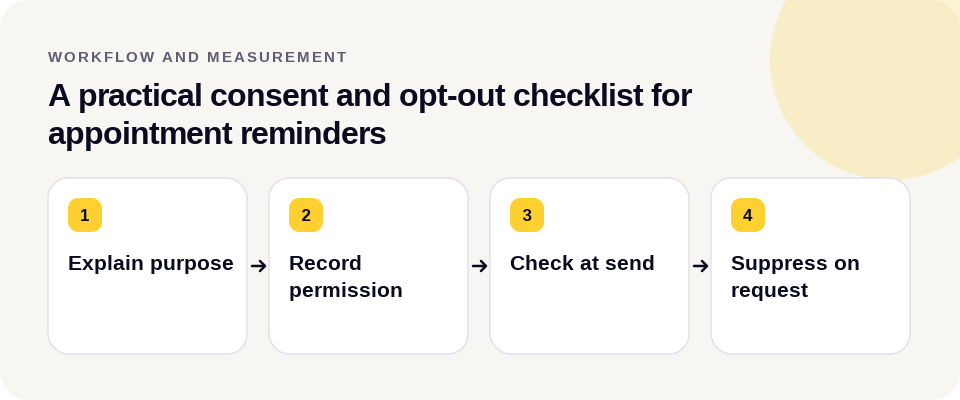
Treat permission as a current state, not a checkbox that once existed on a booking form. Before changing how a business sends texts or email, document the countries and channels involved, the provider and sender configuration, and the precise purpose of the messages. Then confirm requirements for those conditions. This guide describes operational controls and uses one provider policy as an illustration; it is not legal advice, and the rules for a US text campaign cannot simply be copied to another country or to email.
Describe what the customer is choosing
A clear booking screen distinguishes appointment communications from promotional messages. If you invite customers to receive a reminder, describe who sends it and what it will cover, using language they can understand. Avoid bundling newsletters or discount messages into a service reminder label. Do not assume that a phone number collected to arrange a visit is automatically a permission to send every type of text. Ask your provider and a qualified adviser how to implement the notice and permission appropriate to your account and destination.
Build the workflow around the customer's real choices. If an individual declines SMS, record that state and do not structure the workflow to bypass it by using a different sending number. If the customer chooses email, confirm the email address and use that choice only for the explainable purpose. Consider what happens to existing records imported from another platform; if the permission record didn't come across or doesn't cover this use case, hold the automated send until you can resolve the gap.
Save enough evidence, not a second address book
For an auditable permission event, store customer or contact identifier, channel, timestamp, source, stated purpose, current status, and the version of the notice shown. Keep the storage access limited to people who need it. If a person changed a phone number in their account, record which contact endpoint the earlier decision covered. A link between an account and a number is not permanent, and customer support should not infer permission for a new number from an old conversation.
Make the suppression record independent of the reminder queue. A fast opt-out needs to prevent messages already scheduled as well as new ones. When moving data between systems, preserve the suppression state and make a test appointment for a suppressed contact to prove it persists. Decide who can restore a previously suppressed state and what fresh event is needed. A phone number a customer provided again is not necessarily a fresh opt-in; match the facts and provider requirements.
Handle stop requests as a separate event
Twilio's Messaging Policy is an example of a provider rule set, not the law itself. It describes consent expectations and a straightforward way for recipients to revoke consent. Read the policy alongside the actual sender product settings before constructing the workflow. A provider that automatically processes a STOP keyword may also block future messages at the sender level. Your system still needs to reconcile its own contact state so it does not keep attempting the same messages or reassign them to a different sender to get around that block.
Do not let STOP cancel an appointment. If a test text says “stop texting me, I still need Tuesday,” the correct operational result is to suppress reminder text and leave the booking intact. Make sure the routing logic cannot misread human wording as a booking cancellation. If a recipient writes “wrong number,” flag both consent and contact quality for review so staff can correct the customer record through an appropriate route. Do not respond to a purported wrong number by disclosing which person the booking belonged to.
Recheck the rendered message, not just the template
A valid reminder should say who is contacting the customer and what they need to know without inserting sensitive or unexpected information. A generic template can still render inappropriate details if an appointment field holds a treatment description, private address, or staff note. Restrict template variables by channel and test with realistic examples. Test link text and destination behavior, and do not make appointment information visible to anyone who only has access to an old link if your use case requires additional verification.
Keep marketing workflow controls separate. A reminder that appends “Buy another package today” changes the message's purpose. Avoid mixed-purpose copy unless the applicable rules and consent arrangement have been reviewed. For the first release, keep promotional language out of transactional reminder templates entirely. If you offer a second contact method, make sure it is configured and appropriate before telling people to use it, and give staff a way to view a customer's actual preferences during a booking.
Use a launch rehearsal with pass and fail examples
Create four controlled records: permission for appointment texts, email preference only, previously opted out, and imported with unknown purpose. Queue an appointment for each. Verify that the known permitted text renders with appropriate sender information; verify the other SMS messages do not dispatch. Submit an opt-out while a future message is in the queue, and measure whether it is blocked from sending. Test what happens when the provider returns an explicit blocked status and when a staff member attempts a manual send from the same interface.
| Checklist item | Evidence to retain |
|---|---|
| What rules were used? | Country, channel, provider, current policy and review owner. |
| What permission was given? | Timestamp, channel, purpose and notice version; keep records restricted. |
| What happens after an opt-out? | Queued SMS blocks, booking stays intact and internal status matches the provider behavior. |
Verify compliance questions before going live if you handle sensitive visits, minors, multiple regions or unusual list imports. Repeat the rehearsal whenever sender, channel, or provider configuration changes. A written checklist only works when staff can identify the last consent event and show that an opt-out changes actual send behavior rather than just making a red icon appear in a dashboard.
Keep an escalation path for staff when a person disputes a reminder or says they never opted in. Pause sending to the address while reviewing the last recorded event and the booking source. Record the review outcome without asking the customer to repeat personal information unnecessary for support. If you cannot establish that the current purpose was covered, prefer suppression until the customer makes an appropriate new choice under your reviewed workflow.