Copyable templates
Appointment confirmation texts: templates that close the loop
An appointment confirmation text can either tell someone their appointment is booked or ask them to say they will attend. These are different outcomes, and the copy should make the difference unmistakable. A booking receipt says that a slot exists. An attendance confirmation request says that the business would like a response. Keep those meanings separate so a client does not assume the booking will disappear if they have not yet replied.
What is the difference between a booking confirmation text and an appointment reminder?
A booking confirmation is sent seconds after a booking is made or changed and proves it exists. A reminder is sent shortly before the visit and asks for an action: attend, confirm, or move.
| Booking confirmation | Appointment reminder | |
|---|---|---|
| When | Right after booking, and again after any change | 24 hours before; optional 2-hour nudge |
| Who gets it | Everyone who books | Upcoming visits; the nudge only goes to unconfirmed ones |
| Job | Receipt: what, when, where, how to change it | Prompt: show up, confirm or move |
| Expected reply | None required | C to confirm, R to reschedule, or a call |
Confirmation example
Maple Studio: You're booked for Tue, Dec 8 at 2:00 PM with Sam. To change it: maplestudio.com/b/4821
Reminder example
Maple Studio: Reminder: your appointment is Tue, Dec 8 at 2:00 PM. Reply C to confirm or R to reschedule.
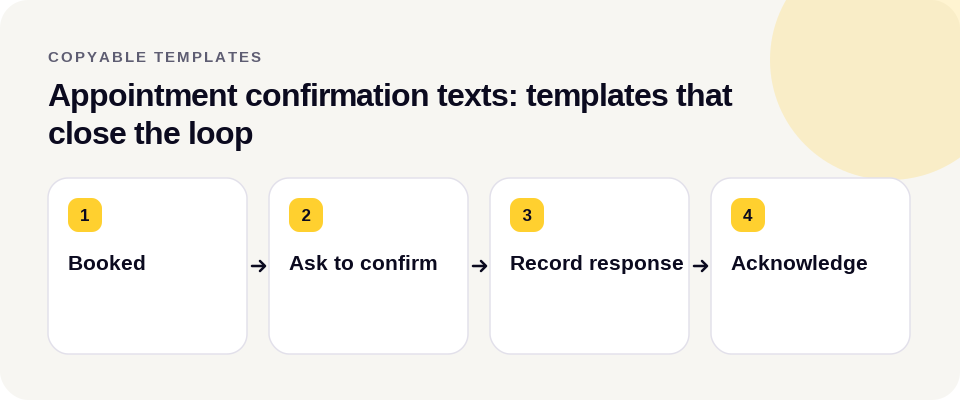
Initial booking: reassure without asking twice
Juniper Studio: You’re booked for Tue, May 18 at 10 AM at 16 East St. To change your appointment, call 555-0130 or use [booking link].
If your booking screen already asked the client to confirm details, this text simply provides the receipt they can find later. Adding "reply YES to confirm" here may suggest that the booking is incomplete. If a slot is genuinely provisional until a deposit or another real condition is met, write "Your requested time is being held until [deadline]" and state the required action. Do not use "confirmed" prematurely to make the message sound friendlier.
Attendance request: make it easy to answer
Juniper Studio: Can you still make Tue, May 18 at 10 AM? Reply YES to confirm. Need a different time? Call 555-0130.
Use YES only if this particular system understands it. If your service expects a different keyword or uses a confirmation link, use the supported action. Avoid offering several competing confirmation methods without reason. Provide a separate path for changes if it can be staffed. Where the operational goal is filling released slots, send this request far enough ahead that a cancellation actually leaves useful time for the worker or waitlist.
Acknowledgment: tell the customer what happened
Juniper Studio: Thanks, your Tue, May 18 appointment at 10 AM is confirmed. Use [booking link] if anything changes.
The acknowledgment is useful when it proves the response worked. Do not send it merely because an SMS provider accepted an outbound message. Send it once for the relevant booking version. A late incoming confirmation for an old time should not silently mark a new time confirmed, especially if a reschedule was only just processed. If the target booking is unclear, route the response to a human or return a safe current-booking action where supported.
Handle ambiguity before launch
A client may have two active appointments attached to the same number, such as two siblings' sessions. A bare YES does not say which one they intend. Tests should cover a single active appointment, two pending appointments, and a cancelled appointment. If accurate attribution is impossible, ask for a specific choice via a trusted appointment link or let a human check. Never confirm both solely to clear the inbox.
Natural responses are another reason to test. "Yes, but I will be ten minutes late" contains a confirmation and an exception the staff may need to handle. A claim that the appointment is "confirmed" cannot take the place of resolving a late-arrival request. Define what a keyword rule will automatically update and send other messages to the right queue. Show staff enough context to respond without reopening multiple systems and guessing which booking the client means.
Avoid turning silence into an unintended cancellation
Not everyone can answer quickly. Phones can be off, email links can get buried, and automated delivery receipts may not prove the message was read. In a normal flow silence is pending, not cancellation. If your business uses an explicit deadline, communicate it before booking, repeat it plainly, and have the appropriate policy reviewed for your operation. Apply it consistently without claiming a result before the proper status change happens.
Escalation should depend on the appointment type and capacity. For example, the manager of a small salon might check tomorrow's unconfirmed list while waitlisted clients can still use the slot. A consultant taking remote meetings may prefer to keep a booked slot and save staff time rather than chase every pending reply. Sample both workflows in a dry run and choose the one that fits your real ability to resolve responses.
Measure each state separately
Track eligible appointments, delivered confirmation requests where known, successfully matched confirmations, reschedule or cancellation requests, and attended bookings. A ratio of matched confirmations to delivered notices is a useful operational measure; it is not the attendance rate. A team can have a low confirmation rate and still run a reliable appointment calendar, or a high confirmation rate and still have difficult arrival logistics. Interpret the event in its actual business context.
Handle measurement with stable definitions. If staff manually confirm an appointment on the phone, record the same status with a different response source. Duplicate texts or repeated YES replies should not create several confirmations for one appointment. If a booking is moved and requires a fresh response, treat the new request as a new version in the operational ledger while preserving the prior response for review.
Launch checklist for a desk team
Give the desk a view of pending, confirmed, needs review, and released slots. Assign one owner for each queue and define the hours during which they will watch it. Try one happy path from text to booking record, one keyword that fails to match, one cancelled appointment, and one reply sent after a time change. Check the language of every acknowledgment against the actual status in the staff view.
Start with an appointment type that the team knows well and work through the first week of replies together. If customers react with too many questions, look at the exact phrase that invited their response before blaming the channel. "Reply to confirm" is less precise than a tested action matched to the actual system. If the main confusion is parking or access, fix that content rather than sending a third confirmation prompt to everyone.
Owner handoff for the weekend
Write down what happens when a reply arrives after closing. If an automatic reply is configured, it can acknowledge receipt and state when a human will review it, but should not promise that a late-arrival request was approved. On Monday the first teammate opening the queue should see the customer message in context, the next scheduled booking time, and whether someone has already responded. A shared queue with an explicit owner is usually easier to trust than a forwarding chain that nobody can audit.
Frequently asked questions
How do you confirm an appointment by text?
Send the business name, the date and time, and one way to change it, for example: "Maple Studio: You're booked for Tue, Dec 8 at 2:00 PM with Sam. To change it: maplestudio.com/b/4821". If you want a reply, ask for one specific letter such as C.
How do I reply to confirm an appointment by text?
Use the exact keyword the message asks for, such as C or YES. If it doesn't ask for a keyword, a short reply like "Confirmed, see you Tuesday at 2" works. If you need to change it, say so and give a day that suits you.
Can I send appointment confirmation texts in Spanish?
Yes. Send confirmations in the language the client chose when booking, and keep the reply keyword the same in every language so your system can read it. See the multilingual guide.