Copyable templates
Multilingual and Plain-Language Appointment Reminders
A multilingual appointment reminder should use the recipient's chosen language, an unambiguous date and time, and an action that works in that language. Translation is only part of the task. The phone menu, email reply queue and booking link also need to support what the message promises. Start by making the original wording clear and short enough to translate without hiding key details in idioms or punctuation.
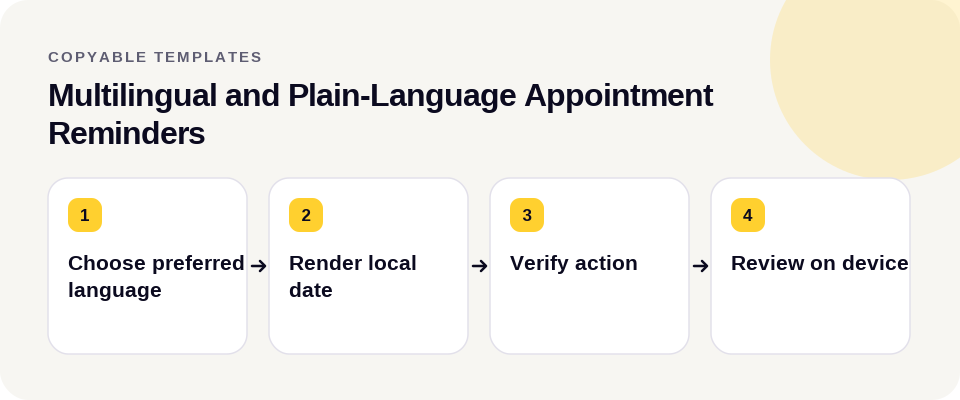
Collect the preference explicitly
Offer a communication language at booking when your business can fulfil it. Avoid guessing from a person's name, address or previous order. A customer may speak one language at reception and prefer another for written instructions. If their preferred language is unavailable, provide a clear supported fallback and a human route when practical. Do not silently imply that specialized support is available around the clock when it is not.
Keep language preference distinct from country and time zone. People travel, use phones set to other locales, and book appointments for relatives. A customer may want Spanish copy for a visit at an English-speaking location. Translate the address guidance where helpful while keeping street or building names recognizable in maps and signs. Verify that staff can find the exact version that was sent.
Plain-language English example
Cedar Studio: Your appointment is Tue, May 18 at 10 AM, 16 East St. To change your appointment, call 555-0127.
This version avoids "touch base," "pencil you in," and "RSVP," which a client may interpret differently or not understand. It also avoids "kindly advise at your earliest convenience" when a concrete action performs better. Use one complete sentence per task. Keep the business identity early and state whether this is a fixed appointment or merely a request. "Your appointment is" and "Choose a time" mean different things.
Spanish example with a staffed phone fallback
Cedar Studio: Su cita es el martes 18 de mayo a las 10 a. m., en 16 East St. Si necesita cambiar la cita, llame al 555-0127.
The sample is intentionally simple, but have someone familiar with your audience review tone, regional wording and any terms tied to your services. Preserve accents and the customer's actual name. If the agent answering the listed number cannot speak the language, add a truthful route to support rather than leaving the caller to discover the mismatch. If you use a customer-selected tone, run both formal and informal examples past an actual local reader before adopting them.
Make dates travel safely
Avoid bare numeric dates such as 05/06 when audiences may read the month and day in different orders. Spell the month out or use another format confirmed by your local readers. For online appointments, include the applicable time zone with a clock time that belongs to that same zone. Translate surrounding text but do not localize a booking date by separately guessing which time zone the recipient is in. Let the appointment logic calculate the moment once and format it clearly.
Relative language such as "mañana" or "tomorrow" can be helpful in a plain sentence but can become ambiguous if delivery is delayed. Pair it with an absolute date where that risk matters. If an appointment is today at midnight in one region and tomorrow in another, test the display for each relevant locale. Your bilingual staff member should be able to compare the reminder and calendar and agree on the instant.
Do not translate actions blindly
If the SMS engine accepts only a specific confirmation code, do not substitute a translated word without configuring and testing it. A link labeled "Cambiar cita" needs to lead to a usable page that lets the client change the visit. If a portal is available only in one language, say so when that would help the reader choose the staffed alternative. Keep a fallback for screen-reader users or recipients who cannot use the page.
Track any unclear replies separately from confirmed events. A person may reply "sí, pero llegaré tarde" and still need assistance rather than just a confirmation receipt. Have staff check requests with multiple meanings. Do not insert private information in an ordinary message just to add conversational warmth or make it easier to match a reply. Use a supported booking reference or secure route when needed.
Check phone and email rendering
Scripts, accents and punctuation may behave differently across SMS encoding and device layouts. Do not remove meaningful marks just to shorten a text. Preview actual rendered names, long dates, a long branch name and a realistic action link. Use the message provider's own measurement tools if billing depends on segments. For email, test the subject, display name and plain-text version, and verify the reading order with buttons and images unavailable.
For right-to-left languages, test mixed-direction details such as a phone number or a street address on real devices. A language that expands compared with English may need shorter headings but not less important information. Reduce filler, not the action or date. Avoid baking message text into graphics because it makes language updates and accessibility fallback harder. Maintain one approved friendly version per use case if possible rather than several poorly tested variants.
Establish a review workflow
Ask a bilingual reviewer who understands the operation to check that the reminder describes the booking correctly and the desired action is unambiguous. Have a second staff member click or reply from a normal phone account and inspect the state that changes. Then test one fallback language, one contact who changes preference, one reschedule and one cancellation. Keep a record of the exact wording approved and what the system supports when the recipient responds.
After launch, pay attention to replies that reveal a translation issue, a broken action or timing confusion. A language variant with low confirmation may still be understood but lack a convenient response path. Correct the actual obstacle before rewriting the whole message. Support and front-desk teams can often spot this from a few examples if they have a way to report them and see what was sent.