Copyable templates
Appointment reminder email templates for in-person and online visits
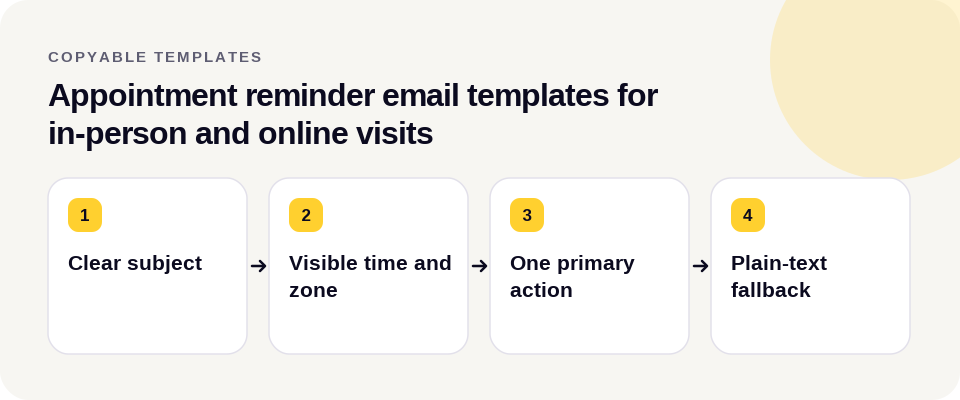
A practical appointment reminder email names the business in the sender or body, gives the current date and time, and tells the reader how to attend or change the appointment. Start with the things the customer has to know before they scroll: recognizable sender, clear subject, date and time, and one next step. Longer instructions are a benefit only when they help someone show up prepared. A pretty banner cannot repair a misleading booking detail.
What does an accessible appointment reminder email look like?
A short subject with the date and time, the details in plain text, one clearly labeled action and a reply fallback.
Subject: Reminder: Tue, Dec 8 at 2:00 PM at Maple Studio Hi Alex, Your appointment at Maple Studio is on Tuesday, December 8 at 2:00 PM Eastern Time. Where: 214 Pine St, Suite 2 (step-free entrance on Oak Ave) [Confirm or change your appointment] Can't use the button? Reply to this email or call 555-0108. Maple Studio
- Button text says what happens ("Confirm or change your appointment"), not "Click here".
- Date, time and zone are written out in text, never only in an image.
- Every action also works without the button: reply or call.
- Send a plain-text version alongside the HTML.
Build the subject around the visit
A subject such as "Reminder: your appointment on May 18 at 10 AM" tells a customer what they are opening. For a mixed-zone online business, put the time zone in the body even if there is not room in the subject. A preheader can carry a short secondary fact, such as "Bring your worksheet or reschedule using the link below." In environments where inbox previews are visible to other people, avoid adding sensitive reasons for a visit to either the subject or preheader.
Changing the subject from the initial booking confirmation can help people distinguish a later reminder from the receipt. The same thread can be convenient if the information is unchanged and the team monitors replies. If the old time has been replaced, consider making the subject explicitly say "Updated appointment time" and put the replacement near the top. Calling a material change a normal reminder leaves the reader to infer the difference.
Copy template: in-person first visit
Subject: Reminder: your appointment on Tue, May 18 at 10 AM
Hello [first name], this is a reminder from [business]. We're expecting you on Tue, May 18 at 10 AM at [street address, city]. Use [entrance or reception detail]. Please bring [only what is necessary]. To change or cancel, use [booking link] or call [phone]. Thank you, [team name].
Only retain the bring line when it prevents a wasted trip. Replace generic "arrive early" with a specific amount of time and reason if you actually need check-in. For multiple branches, spell out the street address rather than assuming the recipient can infer a branch from the business name. Put the actionable logistics first. Test that the "change or cancel" destination shows the customer the correct booking without exposing unrelated appointments.
Copy template: video or phone
Subject: Your video appointment on Wed, Apr 7 at 1 PM ET
Hello [first name], your appointment with [business] is Wed, Apr 7, 1–1:30 PM ET. Use [join link] at that time. If you need another time, [manage booking link]. If you cannot join, call [phone] so we can help.
One button can advertise the join action; an adjacent text link can serve as a fallback. Differentiate join and manage links clearly. Do not use button labels like "Click here," which force someone to infer the destination. For an outbound phone appointment, replace the join link with "We will call the number ending in [last four]." Offer a safe way to correct the number without requesting sensitive information in an inbox.
Copy template: routine appointment
Subject: Appointment reminder from [business]
Hi [first name], your next appointment is [day, date] at [time, zone if useful]. Location: [location]. To update your booking, use [link] or call [phone]. We look forward to seeing you.
Routine clients may not need the full introduction. They may still need a newly assigned venue, staff contact, or parking note. Make any such instruction conditional on the booking rather than pasting branch information into a global template. Decide whether a recipient reply is an acceptable way to ask for a change. If the inbox isn't monitored, remove that wording and offer the staffed channel instead.
Design for the reader's actual inbox
Use a readable text size, short paragraphs, and a proper link label rather than depending on an image containing the booking details. If images are blocked or a customer uses a screen reader, the time and action should remain available. Ensure any meaningful image has equivalent text. Use an actual phone link if suitable but display human-readable digits as well. Keep the plain-text version aligned with the HTML version.
A customer with an older email may click a link after moving the booking. Design for the old message to be useful but not authoritative: the booking flow should show the current state, refuse invalid actions, and provide help if a link has expired. In staff testing, forward a message to a controlled inbox and verify it does not reveal information beyond what the current setup intends. Treat one-click actions carefully when someone else could open a forwarded message.
Know when a text is a better follow-up
A short email may be fine when the customer books frequently and knows the directions. When the visit is near and there is an urgent action, an opted-in reminder text may deserve a separate job: confirming, knowing a door code, or noting a delay. Avoid blasting both versions at the same minute by default. The two channels should offer a coherent story rather than fighting over the same confirmation.
Keep booking updates separate from marketing. A client who wants preparation details has not necessarily invited a product offer into their reminder. Review local obligations and your provider's rules independently before sending automated messages. The wording examples here are practical drafts, not a compliance guarantee for any implementation or country.
Make a five-minute proof
Open the email on a small screen, through an inbox configured for plain text, and with images off. Confirm that the subject, time zone, location and call to action still work. Trigger one confirmation and one reschedule through the customer view and inspect the resulting staff state. If the email has multiple locations or locales, pick at least one of each before any broad rollout. Once it passes, save the example as a regression case for future edits.
If the team makes a new layout later, use the same proof rather than only inspecting a design preview. Important booking details must remain visible on phones, including through dark-mode color changes or without styled button backgrounds. Include a state where the full business name wraps and a state where a location line is absent. The recipient should never be left with instructions that only make sense because the staff member already knows the booking.
Frequently asked questions
What should an appointment confirmation email template include?
A subject that says the booking is confirmed with its date and time, the service and length, the address or video link, how to change the booking, and a note that a reminder will follow. The confirmation goes right after booking; the reminder email goes about a day before.
Can I send automatic email reminders for appointments?
Yes. Most booking and reminder tools send email appointment reminders automatically from the booking time. Check that each email carries a working link to confirm or change the visit, and that moving a booking cancels the old reminder.
What should an appointment reminder email say?
A subject with the date and time, the business name, the time with its zone, the place, one primary button or link to confirm or change, and a plain-text fallback such as "or reply to this email".
Is an appointment reminder email a scam?
A real reminder comes from a business you booked with, mentions that booking, and never asks for a password or card number. If you're unsure, don't click; call the business on a number you already have.