Copyable templates
Appointment Reschedule Message Templates for Requests and New Times
A reschedule message should tell the client whether the original appointment is still booked, what action they can take, and what will count as a confirmed replacement. Many scheduling mistakes happen between the request and approval, when one person believes the slot has moved and the other believes it has not. Write those messages as separate states. When a business has to withdraw the original time, say so openly rather than asking whether the customer is flexible.
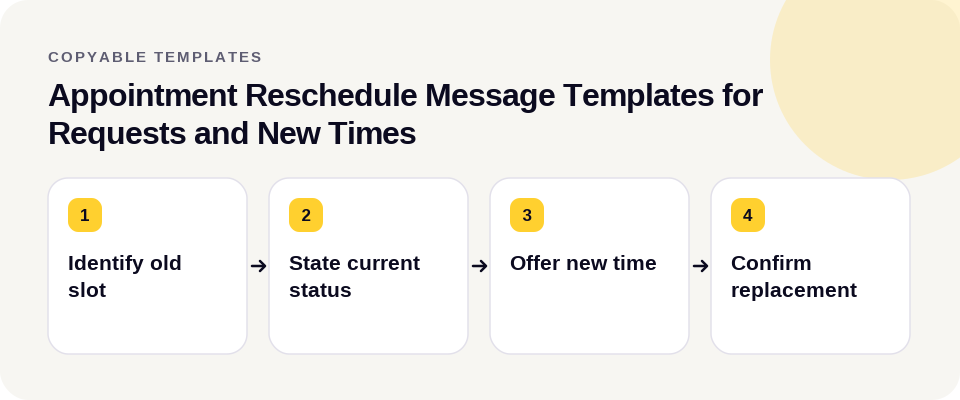
Acknowledge a customer request
Harbor Coaching: We received your request to change Wed, Apr 7 at 1 PM ET. That time is still booked for now. Choose a new time at [manage booking link] or call 555-0132.
Only use "still booked" if your actual rules hold the slot. Leaving the original time on the calendar while searching gives a customer a fallback, but it also ties up capacity; a business may instead release the old slot as soon as the customer requests a change. If so, say "we released the original time" and distinguish the still-pending replacement. People should not have to infer policy from the booking screen.
When the business must move the appointment
Subject: We need to move your Wed, Apr 7 appointment
Hello [first name], we're sorry, but Harbor Coaching can no longer hold Wed, Apr 7 at 1 PM ET. Please choose another time at [link] or call 555-0132. No new time has been reserved yet. If you prefer not to rebook, contact us for help with any payment already made.
Start with the important change, not a long operational explanation. A vague promise to "reach out soon" moves the problem to the customer unless a staff member is assigned to call. Offer a straightforward path with actual availability. If an entire team is affected, reserve a short block for direct outreach to customers whose appointment is soon and who cannot open the standard booking path. Do not guarantee a refund date unless it is known.
Send confirmation only after the replacement is saved
Harbor Coaching: Your appointment moved from Wed, Apr 7 at 1 PM ET to Thu, Apr 8 at 4 PM ET. Do not use the Wednesday time. Your current details: [booking link].
Give both times so a reader can identify the old calendar entry and know which one to keep. Use one time zone per booking when both times are in the same zone; explicitly label each if they are not. If the booking moved from video to in-person or changed branch, add that difference in the same notice. A customer who downloads calendar data may still have the old entry; tell them what to do if their calendar does not replace it.
Offer options without creating a false booking
Harbor Coaching: We can offer Thu at 4 PM ET or Fri at 11 AM ET. Reply with your preference. We’ll confirm after we save the new time.
This version works for manual desks that cannot reserve a displayed option. Two recipients can ask for the same slot between the moment a text is sent and when the reply appears. Do not claim either offer is secured unless the system actually holds it and enforces expiry. For options with a deadline, specify the deadline and time zone, and say what happens if nobody responds. If a posted option is taken, offer a new choice rather than writing an ambiguous apology.
Design the operations handoff
Your staff needs to see the source booking, the old time, the proposed replacement, the party that initiated the request, and any promised follow-up. A request that reaches a general inbox but cannot be attached to a booking is not self-service, even if the email looked automated. For an appointment shared by multiple team members, define who can change it and who receives the final update. A change to staff or room can be as consequential as a change to the customer-facing time.
When the new time lands, remove future reminders for the old appointment or booking version. Update calendars and verify notices before treating the move as complete. Do not rely on blanking the old template or deleting a pending email while three other jobs still exist. If a notice was already handed to a provider, it might not be retractable. An explicit replacement message then matters more than assuming the previous notice vanished.
Distinguish links that propose from links that commit
A button labelled "Choose a new time" should land on the current booking and show available options. A button labelled "Confirm new time" should state which time it commits before the customer proceeds. A link in a familiar old message can outlive that booking version. Make it show the current state or a safe expiry notice, not change a new appointment from stale information. Test forwarded and expired cases with dummy records and limit what the page reveals.
Virtual appointments can add a special failure: the event moves but the join URL or local host schedule does not. Confirm the link from a recipient account and make sure the host has the revised invitation. For an in-person appointment, test that the map and entrance note are tied to the new branch. These are operational changes, not merely date formatting.
Prove it with a same-day rehearsal
Create a booking, send a reminder, move it across a day boundary, and trigger the new notice. Inspect both calendars and the customer's latest email or text. Try replying to the old thread and opening the old link. Verify the old job is suppressed and a staff member can follow the chronology without reading raw logs. If your desk can handle phone and online changes, run the proof once for each route; differences here routinely show up after copy has already been approved.
Keep status visible while the request is open
A staff view should separate outstanding requests from completed moves. Show the original time and an obvious age indicator, especially if the request is near the original start. Give the client an expected decision time only when the desk can meet it. When a customer phones in before receiving a response, the operator should be able to identify the request immediately rather than opening a second one. Close the loop with an explicit acknowledgment even if the replacement is the same time after all.
Frequently asked questions
How do you politely ask a client to reschedule?
Apologize once, name the original slot, and offer a concrete next step: "Maple Studio: Sorry, Alex, we need to move your Tue, Dec 8 2:00 PM appointment. Pick a new time: maplestudio.com/b/4821 or reply R for options."
What should a reschedule message include?
The original date and time, whether it's still held, how to choose a new time, and, once agreed, a confirmation of the new slot that says the old one is released.