Workflow and measurement
How to troubleshoot appointment reminders that do not arrive
Trace a missing SMS or email from dispatch to provider status and isolate the cause before retrying.
My dashboard says a reminder was sent, not delivered. What should I check before retrying?
"Sent" means your provider accepted the message; "delivered" means the carrier reported it reached the handset. Don't retry blindly; a late receipt can still arrive, and a retry then becomes a duplicate.
- Read the provider's status and error code for that exact message.
- Check the number: country code, typos, landline, or a recycled number.
- Check for an opt-out (STOP) or a carrier block on your sender.
- Check content: a long Unicode text, a link shortener or missing sender name can be filtered.
- Wait for the final status before retrying, and retry once through a different channel (email or call) rather than the same text.
Twilio's message status article lists the states (queued, sent, delivered, undelivered, failed) and what each means.
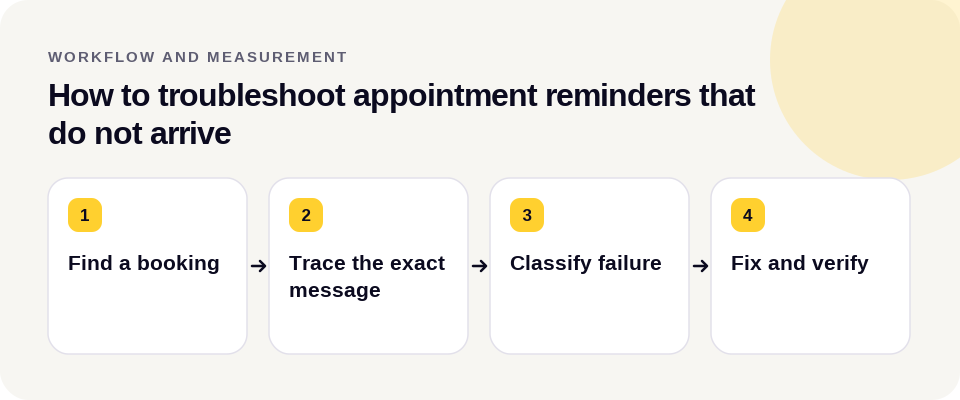
If someone says they never received a reminder, check the booking, the dispatch record, and the provider status in that order. “Scheduled” does not mean “sent,” “sent” does not necessarily mean “delivered,” and even a delivery status is not proof the person read the message. A useful support answer names what your system knows and what it does not. Resist the temptation to immediately send a second copy, because the first one may be delayed, or the customer may have explicitly opted out.
Find a real example without asking for private details
Start with a booking identifier, appointment date and an authorized way to confirm the account. Confirm which channel was expected. Some customers remember being told “you will get a reminder,” but were only configured for email and looked at their texts. Check the channel preference, recipient endpoint and reminder rule active at send time. Avoid asking customers to share intake notes or posting full contact addresses into a support thread. Mask identifiers where possible and keep the investigation tied to the booking rather than copying the customer's history.
Check that the current booking was eligible. A moved or canceled appointment may suppress the previous alert. A short-lead booking may never have qualified for the planned 24-hour stage. The state “quiet hours” might mean it was shifted or that it was intentionally never sent. Give staff readable suppression reasons and enable them to tell the difference between a correct intentional decision and a problem. You can fix a confusing expectation without changing working transport infrastructure.
Trace the handoff and interpret statuses narrowly
For SMS, capture the provider reference and latest available status. Twilio, for example, documents different outbound status stages and status callbacks. Match the latest meaningful state to the same message reference; duplicated or delayed callbacks should not overwrite a definitive terminal outcome incorrectly. The sender ID or number, country, permitted destination, delivery timestamp where available, and provider error category help discriminate between a bad path and a recipient-specific issue. Provider terminology and error codes should be interpreted using documentation for the actual sending product.
For email, separate successful submission to your sending system, receiving server acceptance, and placement into a mailbox folder. You usually cannot see personal inbox sorting. Check whether the address was ever accepted, whether it bounced, and whether a prior suppression blocked sending. Google’s email sender guidelines describe requirements and recommendations for mail to personal Gmail accounts; the required controls depend on sender circumstances. If a business changes sending domain or provider, verify authentication and alignment rather than assuming yesterday’s setup still applies.
Compare one failed reminder with one that worked
Use two samples that differ in as few conditions as possible. If one failed text and one delivered text used the same sender, country, template and approximate time, investigate endpoint issues first. If many failures started just after changing content, compare the new destination links, characters, and actual rendered messages. If they cluster by destination carrier or calendar feed rather than template, trace the dependency common to that cluster. A daily aggregate can hide a specific segment failure even when the overall delivery count looks stable.
An illustrative case: one customer reports a missing SMS. The appointment was moved on Tuesday; the old 24-hour reminder is marked suppressed, and the new one was never scheduled because the revised visit is inside the cutoff. There is no transport issue in this case. A different case has a message accepted by the provider and then marked undelivered for several similar recipients after a sender change. That deserves provider investigation, not an edit to the scheduling lead time. Classify the incident before prescribing a fix.
Retry only when a retry is useful
A temporary error may warrant a bounded retry if the booking is still valid, the reminder window still useful, and permission remains in effect. A hard bounce, blocked channel, bad number or opt-out is not a reason to keep resending. If the previous attempt's outcome is unknown, find out whether it was accepted when you can; blind resubmission may double-send. Have the workflow retain its own event identifier and provider identifier so support can reconcile rather than guess.
If a customer asks for immediate details, use an authorized support channel and verify the appointment state first. A phone call may be appropriate for an agreed service relationship, but do not use a new sender or channel simply to bypass suppression. Address the customer's immediate need without trying to manufacture evidence that your system delivered a notification. A good message says, “Your visit is still booked; we are checking what happened to the reminder,” rather than insisting that a provider status means they saw it.
Close incidents with evidence and prevention
| Finding | Next check |
|---|---|
| No queue record | Inspect booking eligibility, time zone, and creation/change history. |
| Accepted but later undelivered | Look at the provider-specific error and comparable destinations. |
| Server accepted the email | Check customer expectation and folder sorting; do not represent acceptance as proof of reading. |
Write down the cause, the smallest fix, and the test that would have caught it. Re-run a controlled appointment using your own contact details and confirm a normal send, a legitimate suppression and a restored workflow. Then watch the relevant segment over a defined period instead of claiming deliverability is fixed based on one success alone. A durable monitoring habit is to track duplicate sends and missed eligible sends alongside delivery outcomes, because correcting one by mass retry can make the other worse.
A support team can keep a small diagnostic table without copying customer details: internal booking reference, planned stage, channel, suppression reason, redacted destination region, provider reference and final known state. Add the time you checked, because a queued or ambiguous status can change later. Tie that row to the applicable workflow version. When someone reports several reminders missing, count distinct eligible appointments rather than the number of tickets; one customer may write to more than one support channel. Conversely, many booking references failing under one send window can signal a platform incident that deserves an immediate pause and investigation rather than individual manual retries.