Software buyer's guides
One-way vs two-way appointment reminders
Understand the difference between sending a notice, capturing a confirmation and running a monitored reply workflow.
What is a two-way appointment reminder?
A two-way reminder is a text the client can reply to, where the reply is read and acted on. One-way reminders only inform; a reply goes nowhere or gets an automated "please call us".
| One-way | Two-way | |
|---|---|---|
| Client replies | Ignored or auto-answered | Read and routed |
| Confirmation | Unknown until the client shows up | Recorded when they reply C |
| Cancellation | Needs a call | Reply X frees the slot |
| Staff work | Chasing by phone | Only unclear replies need a person |
What one-way messaging does well
A one-way reminder is a notification from a business to a customer. The destination might be a handset or an inbox. The customer can still contact the business, but the reminder itself does not accept or process their response unless a separate route is provided. This can work for a pool opening, a drop-off deadline, or a webinar where the time is stable and recipients rarely need to rebook. It is also suitable when staff cannot promise to check an inbound queue on evenings and weekends.
A one-way message must not sound conversational if no one will see the response. Put the supported action and the working contact method in the text or email. If a link lets someone change a booking, check the tool shows which booking they are about to move and gives them a clear receipt when the change is complete. If there is no automated contact option, consider a phone number with hours rather than an open-ended invitation to reply.
Two-way is not one feature
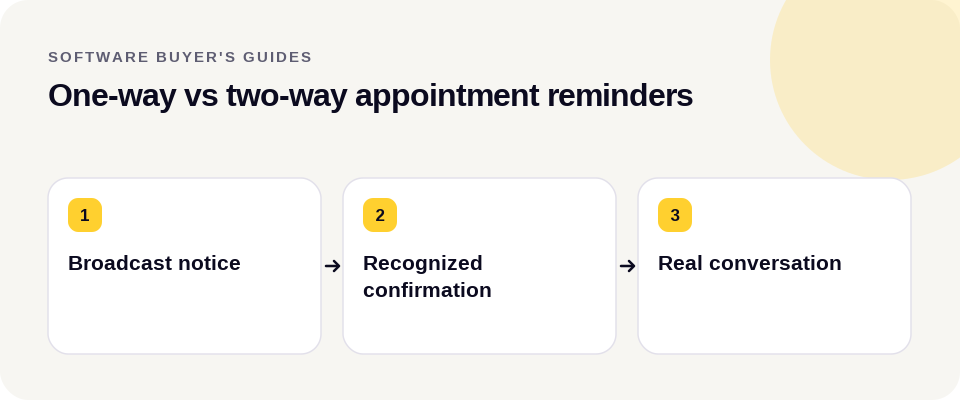
In a simple confirmation flow, replying with a supported code may mark the appointment confirmed. Some tools also allow web actions for reschedule and cancel. A full conversation flow accepts free text, routes questions to staff, keeps a history, and gives someone responsibility for closing the request. A sales page might call either feature “two-way.” Ask for a demo of the specific action you need, not a yes-or-no answer about two-way SMS.
Example: A client gets “Reply C to confirm.” They send “Can I come at 4 instead?” A safe confirmation router does not treat the first character of that sentence as agreement. The system should show the question to staff or send a clear response explaining how to request a change without suggesting that the time moved.
Confirmation, requests and changes must stay separate
A useful appointment state can be pending, confirmed, reschedule requested, changed, canceled, or complete. An incoming reply does not necessarily transition the record. “I need a different time” is a request, not a move. “Maybe” is not a confirmation. A recognized confirmation should appear beside the right booking, not simply as a message in a long customer thread. If a client has two upcoming bookings, test how the system identifies which one their action refers to.
For communications, confirm what the recipient is likely to see after a request. “We received your message” is safe if that is all that happened. “Your appointment has moved” should appear only when the new time is actually saved in the authoritative calendar. Keep a history of both the request and the person or automation that resolved it, so the front desk can reconstruct what happened without reading every unrelated message.
Work out the cost of accepting a conversation
List the requests staff must handle: new time, no ride, late arrival, question about preparation, wrong number, duplicate message, or accessibility assistance. Give each a first response expectation and an owner. Write down what happens after closing time and what the customer should do if their appointment is before the inbox opens. The queue should not depend on one person who is simultaneously taking calls and serving walk-ins.
Conversation may add subscription or usage costs. GoReminders, for example, distinguishes recognized appointment confirmation behavior from its messaging add-on for continued conversations. That is an example of a vendor-specific split, not a rule for all platforms. Ask how incoming and outgoing messages count, and whether unsupported responses or second staff members require another plan or meter.
Create response rules before turning on inbound
Design for words customers actually use. A clear confirmation code can help, but keep the normal cases easy: upper and lower case, a trailing period, a polite reply, a question, and a person who replies after the slot has passed. Test the provider’s handling of the applicable opt-out language separately from ordinary replies. You do not want a marketing or scheduling rule to misread a request to stop messages. Document where staff see the status change and which group can safely correct a mistaken recipient record.
When a conversation goes beyond scheduling, let staff move it to the right channel. Public or shared-device notifications are poor places to discuss sensitive details. Avoid asking for account details, complete medical records, or payment information in a reminder thread. A route to a known secure process is more useful than forcing every issue into the chat just because the channel is technically available.
Test a handoff with your actual staff roles
Ask two employees to use limited, non-admin accounts in a test environment. Have one receive an ambiguous reply and leave a note before ending the shift. Ask the second to resume the issue without help. They should be able to see which booking is affected, what the customer was told, and whether the appointment remains held. Ask a supervisor to review without gaining access to other locations or unrelated records.
Run an after-hours case too. A confirmation can be processed without staff if the vendor supports it; a personal request may be waiting until a desk employee arrives. Make the automatic acknowledgment clear about the difference. Do not infer a service-level promise from the software’s ability to receive messages at any time.
Which should you buy?
Choose one-way if the reminder is informational and a separate route covers rare exceptions. Choose action capture if your main goal is a booking confirmation or structured change request. Choose full two-way messaging only when a real person can own the inbox and its handoffs. Track staffed response time, resolved requests, and slots recovered after early cancellations. More conversations are not necessarily better; fewer avoidable questions and clearer attendance decisions are.
For a small team with uneven staffing, consider starting with an explicit confirmation action and a monitored phone fallback. Do not change all old templates at once. Pilot the new wording on one type of booking and review a sample each morning. Look for repeated questions that the original message could have answered. If every sixth reply asks which door to use, clarify the source instructions rather than celebrating a rise in engagement.