Workflow and measurement
SMS reminders for Google Calendar bookings: how to connect a calendar safely
Choose between a calendar link, subscribed feed, or API sync, and test moves, cancellations, and recurring visits before dispatch.
How do I send clients SMS reminders from Google Calendar without sending one after a booking is moved?
Google Calendar's own notifications reach the calendar's users and invited guests, not clients by text. A reminder tool has to read your events and send the SMS itself, and it must re-check the event just before sending.
- Calendar notifications remind the people on the calendar. They don't text a client who isn't on the event.
- A read-only calendar feed (an iCal/ICS link) is re-read on a schedule. A move made after the last read is invisible until the next one, so a stale reminder can still go out.
- Native sync or booking in the reminder tool keeps one source of truth. When the booking moves, its reminders move with it.
| Test | Do this | Pass if |
|---|---|---|
| Edited event | Move a test event from Thu 2 PM to Fri 10 AM | No Thursday text; one Friday reminder is scheduled |
| Canceled event | Delete the event 30 minutes before its reminder | Nothing sends |
| Recurring series | Change one weekly occurrence | Only that occurrence's reminder changes |
| Duplicates | Copy the event to a second calendar the tool also reads | The client gets one reminder, not two |
| Personal block | Add a "free" or private event | No client text |
| Missing phone | Create an event without a number | The tool flags it instead of skipping silently |
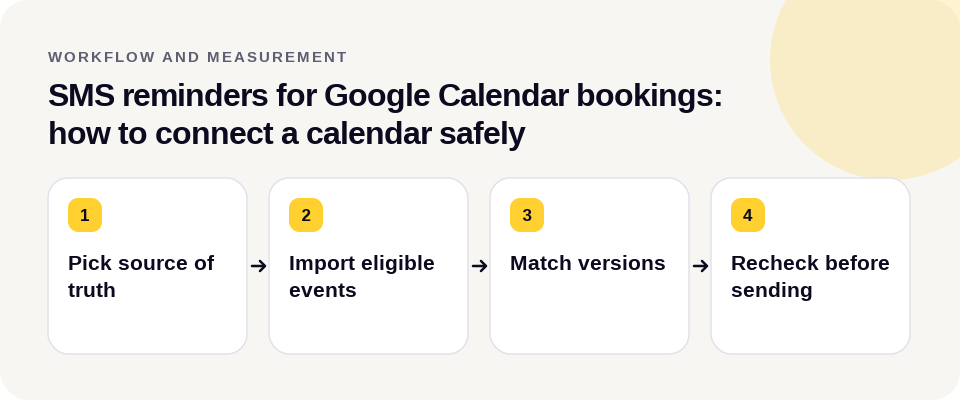
Connecting a calendar to reminders is mostly a question of ownership: which system actually knows that the booking exists, and which one only displays a copy? A reminder must read the current appointment, not a stale calendar duplicate. Calendar files, feeds and API sync all have legitimate uses, but a product that says “works with Google Calendar” may mean an Add to Calendar link rather than automatic ongoing synchronization. Check the direction, pause behavior and record matching before granting a tool access to real customer schedules.
Know which connection you are buying
A one-time calendar file lets a person add a copy of a visit to their calendar. It is useful for attendance but doesn't promise ongoing updates to an already imported event. A subscribed calendar feed publishes calendar entries for a calendar client to fetch periodically. Actual refresh depends on the client and setup, so test how long a moved event takes to appear rather than promising instant behavior. An authenticated integration can read, write or subscribe to changes by API, but those are three separate capabilities. Do not assume a system that exports events also imports every edit from another calendar.
Decide which calendar is a trusted source and which is a destination. If the booking app holds contact permissions and service constraints, it might be the only place allowed to confirm a new appointment. Staff may read the mirrored external calendar without being able to modify the booking from it. If external edits are supported, define what a new event means: an internal staff block should not become a customer message because somebody named it using an email address.
Use an identity that keeps changes attached
Track an appointment record and the external identifiers relevant to each integration. In iCalendar, a UID identifies a calendar component, and recurrence exceptions can identify a particular occurrence. The Google Calendar API distinguishes its event ID and iCalendar UID; the latter may be shared by recurring instances, and the original start identifies an instance within the series even when that instance is moved. An integration that assumes the title or the displayed start time uniquely identifies a booking will mishandle duplicate names and rescheduling.
For a synchronous dispatch, a record should tell you the active start time, current cancellation state, source version or change timestamp, and the identity of the relevant occurrence. Use stable IDs and the latest verified state to invalidate scheduled reminders after a move. Some system exports show a re-created event under a different ID; if you cannot reliably match it to a known customer appointment, send it to review rather than merging rows that happen to have the same title.
Exclude events that are not appointments
Use eligibility rules instead of parsing arbitrary event descriptions. Exclude test calendars, holidays, all-day blocks, prep shifts without customers, holds, and private staff appointments. Require a match to an authorized customer relationship and a permitted contact channel. Do not scrape attendees from all events on a staff calendar and send them a text simply because you found contact data. A busy calendar describes occupancy, not authority to contact the people named in it.
Minimize access wherever possible. For a service that only needs one resource calendar, do not begin by granting it access to every calendar associated with a personal account. Check whether unsharing a calendar disables reads and whether employees can remove access when they leave. Watch for tokens or feed addresses that should not appear in public pages or support screenshots. Document who owns reauthorization when a connection stops updating.
Simulate the three failures that hurt most
First, create a valid test booking at 10 AM, wait for it to appear in the destination you normally use, and move it to 11 AM. Verify that only the new reminder is eligible and no stale queue entry can send. Second, cancel another visit with a reminder pending. Confirm that the dispatch step reads cancellation even if the browser's calendar still shows an older entry. Third, move one occurrence of a recurring series and leave the other dates in place. The wrong behavior is updating all dates or duplicating one appointment under two start times.
Add a disconnected integration case. Remove access in a test environment and confirm staff see a stale or revoked-integrations message rather than a healthy green state. Decide whether dispatch should pause if the source of truth is down. “Last checked five hours ago” is more actionable than “connected.” Record how long it took before the system noticed the outage and who gets the notification. Don't assume email can be sent safely just because SMS has stopped.
Know exactly what you support
| Connection type | What to tell customers |
|---|---|
| Calendar download or link | Can add an appointment to a calendar; do not promise automatic updates without testing. |
| Subscribed feed | Calendar client refreshes the feed on its own schedule; use measured expectations. |
| Authenticated read or write integration | Name the actual calendar, direction of sync, and behavior when events are moved or canceled. |
Set a rule for the business owner: if two screens disagree, which one does the front desk use? Then write that rule next to the change instructions, not hidden in an engineering diagram. Pair it with a simple monthly validation: create a dummy booking, move it, check all connected views, and make sure the original reminder stays suppressed. A second screen adds value only when it helps people find the right schedule without becoming a second authority.
Put a short tie-break policy into the integration handover document: list an example of a booking-only edit, a permitted external calendar edit, and an external change that requires human review. For example, give staff permission to rename an internal note in a display copy without turning that change into a client update. Reserve appointment moves for the booking system unless your verified integration can preserve customer permissions, resource capacity and conflicts. Make the distinction part of onboarding, not a tribal rule learned after someone misreads a sync badge. A clean separation also makes it possible to disconnect a display calendar without deleting customer bookings. Add ownership and rollback instructions before enabling write access in production.
Primary references
- RFC 5545: iCalendar identifiers, recurrence and time zones
- Google Calendar API Events resource: identifiers and recurring-event exceptions
Frequently asked questions
Can Google Calendar send text message reminders?
No. Google Calendar SMS reminders ended on January 7, 2019, when Google replaced them with in-app and email notifications. To send appointment reminders from Google Calendar bookings by text, you need a reminder tool that reads the calendar and sends the SMS.
Is there a free SMS reminder for Google Calendar?
Some tools have free tiers, though texts usually cost money because carriers charge per message. Check how many reminders the free tier includes and whether it renews monthly.
How do Outlook appointment reminders work for clients?
Outlook appointment reminders notify you, the calendar owner, not your client. To remind clients, use a booking or reminder tool and subscribe Outlook to its calendar so your bookings show up there.