Workflow and measurement
How to fill a canceled appointment from your waitlist
Create a fair offer and expiry workflow that confirms one new customer without accidentally double-booking the opening.
How do you fill a canceled appointment slot quickly?
Offer it to one person at a time, with a short expiry. Broadcasting to the whole list creates double bookings and disappointed clients.
Maple Studio: A 2:00 PM slot opened today with Sam. Reply YES in the next 20 minutes to take it.
- Match the slot's length and staff to who's waiting.
- Send to the first match; wait for the expiry.
- On YES, book it and confirm; on no reply, move to the next person.
- Make sure a late YES can't create a second booking.
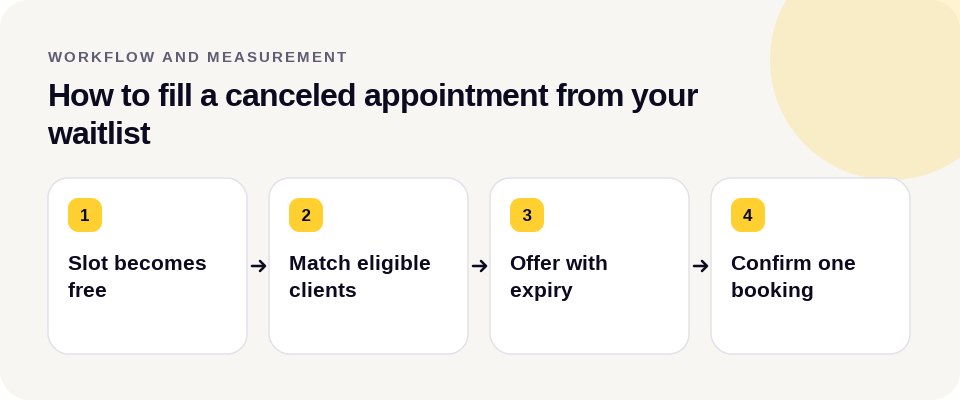
A waitlist is a way to recover a real opening, not an invitation to message everyone whenever the calendar changes. Start by defining which canceled visits may be offered, who is eligible to receive offers, and what accepting means. A good process confirms exactly one booking and clearly tells everyone else their reply did not guarantee a place. You can pilot it with a spreadsheet and staffed phone before automating the calendar transitions.
Build a list you can act on
Record the service the person wants, the earliest and latest suitable dates, preferred location and practical time windows. “Any weekday” is less useful than “Monday to Thursday after 3 PM and at least two hours' notice.” Record whether they asked to be notified through a certain channel and use that channel only when appropriate for the permission and use case. Keep the list current. A contact who already booked another appointment may not want an extra one, and permission to receive an existing booking reminder need not cover waitlist offers.
Match on real delivery constraints first. Thirty minutes with a junior staff member cannot replace a sixty-minute service that needs specialist equipment. An opening for an in-person appointment needs travel time; an already prepared online follow-up may have more flexibility. The match result should show why each candidate qualified so a person can diagnose an empty result. Store only the details needed to decide; avoid putting diagnoses, private reasons for a visit, or detailed notes into the offer message.
Choose an allocation rule people understand
One-at-a-time offers provide clarity. Select the earliest eligible request, give them a usable reply window, and then move to the next candidate when the offer declines or expires. This works for sessions several hours or days ahead. When you have a very short window, an explicitly first-come offer to a small eligible group can work if your booking system has genuine conflict protection. It should say that the opening is not reserved until confirmation. If staff are entering responses manually, sequential offers are easier to keep fair.
Don't pretend priority is strictly first-in if you prefer existing clients or screen based on service suitability. Document the actual priority and decide how a client keeps their place after declining one inconvenient offer. A useful policy can leave someone on the list when they decline a particular day but remove them if they no longer need the service. Do not reward speed by default if the customer had no realistic way to read an overnight offer.
Give an offer a clear expiry
An example message: “Hi Ana, Cedar Studio has an opening Tue 12 May at 3:30 PM at our Central location. Reply by noon if you’d like it. It isn’t booked until we confirm.” Use an explicit date where “tomorrow” could cross a time zone or overnight queue. The expiry must actually match the booking rule. If the offer is held for the recipient, say the hold expires at noon; if others can accept sooner, say so. A customer whose reply arrives after expiry deserves a firm status rather than a silent stale booking.
Suppose a 3:30 PM haircut is canceled at 9:00 AM. The first eligible customer asked for two hours’ notice, and a noon deadline leaves ample room for travel. You offer at 9:10 AM and hold only until 10:10 AM if the stated policy uses a one-hour response window; use 10:10 in the actual message. If there is no answer, release the hold, offer the same date to the next person with an appropriate expiry, and ensure the first link or keyword cannot write a booking later. A customer replying after the new booking should be politely told it is unavailable.
Keep a single owner for the opening
Closing one booking and filling the gap are separate actions. The first releases the slot only when the calendar and any capacity constraints agree. The second creates a new booking only if the slot is still open, the offer is valid, and the person is still eligible. In an automated flow, check availability and reserve capacity together so that two nearly simultaneous replies cannot both win. In a manual flow, the desk owner should mark the slot held and be the sole staff member authorized to finalize it until the offer expires.
When the successful replacement is written, use the normal booking confirmation so the client receives location, arrival, and change details. Ensure pending offers close and late replies do not send the earlier template again. If a desk employee accidentally booked a walk-in while an offer was active, the current appointment record takes precedence; stop additional outreach and apologize to the waitlist recipient if clarification is needed.
Measure recovery rather than message volume
Record vacancies eligible for recovery, offers sent, acceptances, confirmed replacements and attended replacements. A received “yes” is not recovered revenue. Only a booked replacement with the capacity closed counts as a replacement, and only a realized contribution belongs in a financial metric. Track lead time to refill because an average can hide slots that remained empty for several different reasons.
| Metric | How to report it |
|---|---|
| Recovery rate | Confirmed replacements divided by eligible vacancies; also report attended replacements. |
| Time to first valid offer | Minutes from confirmed vacancy to a correctly matched offer, not simply to the first message. |
| Over-offer rate | Number of offers for an opening already taken or invalid, audited from the event record. |
Start with one service for which the calendar has reliable duration and availability data, then sample the first ten eligible openings. Review why a match failed, how many unnecessary messages staff sent, and where a person had to intervene. A useful waitlist wins even if the answer is “not today” because it gives the customer clarity and preserves an accurate schedule.
Offer success can vary for reasons unrelated to the candidate list. An unavailable booking page, an inaccessible link, or an offer too close to start time may be the actual problem. If few recipients accept, compare read or response opportunities before changing priority rules. Never infer that the entire waitlist was uninterested because one notification attempt expired; retain the distinction between declined, expired, undeliverable, and booked elsewhere.