Software buyer's guides
Alternatives to manual appointment reminder calls
Replace repetitive confirmation calls without losing the personal follow-up that complicated bookings still need.
Inventory why people are calling
A manual reminder call often mixes several tasks. A caller checks that the customer knows the time, makes sure they have instructions, answers questions, and sometimes negotiates a new slot. Automation can remove the repetition but should not take away the part that benefits from judgment. For one week, ask staff to tally what a call actually did: delivered a reminder, captured a confirmation, left a voicemail, changed the schedule, corrected contact data, or solved a special request.
Group the results by booking type. A weekly lesson with the same room and teacher is different from a first visit to a site with confusing access. If calls mostly go to voicemail and the caller reads the same basic details each time, start with that segment. If a particular service needs ten minutes of preparation explanation, improve the booking instructions first. Then decide whether a selective personal call is still worth it.
Give each alternative a defined purpose
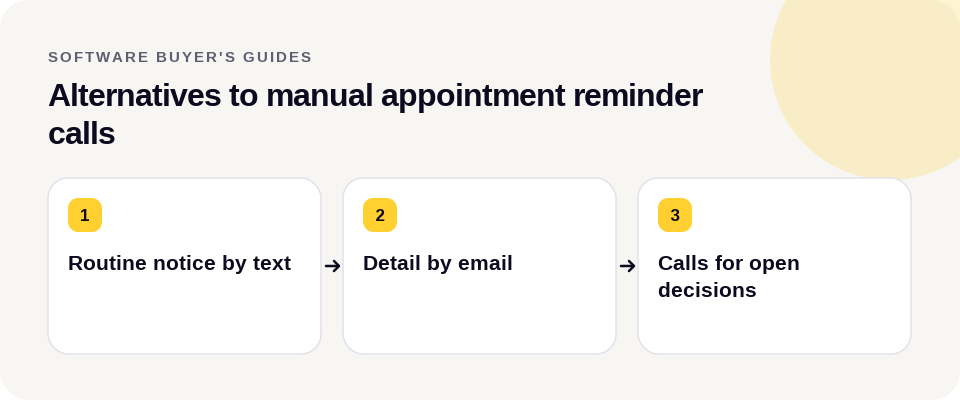
A short SMS is a good replacement for mechanically reading a time and asking for a simple decision. A booking email can replace a recitation of directions, links, or preparation instructions when the reader wants a record. A calendar invite gives someone a durable entry in their own schedule when the connection is reliable and accepted. A secure booking portal can let the customer confirm or choose a new time without waiting on hold. These are not interchangeable routes; each has a point where a question can still go unanswered.
If an automated voice reminder is appropriate for a recipient’s needs, test the actual call and voicemail behavior instead of assuming it works the way a staff call does. Voice is not always available on every plan or destination, and a recorded message cannot resolve an unexpected request. For every channel decide how a customer can correct an error or talk to a person, and test that path before it appears in live copy.
Keep a short, useful callback queue
The goal is to call fewer people for better reasons. Make a queue for failed delivery, time-sensitive change requests, accessibility accommodations where needed, and unconfirmed cases with a defined reason to follow up. Staff should not need to call everyone who did not reply. Some clients deliberately keep notifications muted; others read the reminder and attend without confirming. A callback list based on silence alone can become the old workload with a new dashboard.
Give each callback a reason and a deadline. “Undelivered notice, tomorrow’s 8:00 AM slot, contact channel probably invalid” is more useful than “not contacted.” Assign one employee as owner and designate a backup. When a person changes time, the employee should confirm the change in the booking system and verify the next notification reflects the new slot. Logging an attempt is not the same as completing the task.
Teach the team what to say in transition
At booking, explain the expected sender and ask how the customer wants to receive scheduling notices. Avoid an ambiguous promise like “Someone will remind you.” Instead say what channel is used and what to do when the recipient needs help. In voicemail, keep the content neutral if other people could hear it. Train staff to verify the recipient before sharing anything beyond information appropriate to the channel and the organization’s process.
Example: “We’ll text you a short reminder tomorrow from our scheduling number. You can reply C to confirm. For a different time, call the front desk at 555-0169 during business hours.” Use wording like that only after verifying the number receives the reply and the front desk can act on changes.
Put real staff time in the comparison
Consider a hypothetical desk that makes 120 routine calls in a week. A time sample shows an average of two minutes per attempt, including checking the schedule and making a note. That makes four staff hours before any call backs. After switching 90 low-risk appointments to automation, the desk still makes 30 routine calls and handles 12 automated exceptions. If those calls and exceptions take a combined 84 minutes, the workload is reduced by 156 minutes. Use this as a model, not a prediction. The exceptions could take longer if contact data is outdated or replies go to several queues.
Track replacements that preserve the booking experience, not just reductions in total calls. Watch attendance, late cancellations, wrong-number reports, and unresolved support requests. Ask two staff members how often they have to repeat a task because they cannot see whether the system already did it. A good workflow reduces duplicate effort and still tells staff when human intervention is necessary.
Avoid replacing human courtesy with a dead end
Messages sent from a number that cannot accept replies should not say “Let us know.” A portal login may be appropriate for private actions but unnecessary for a basic request to change the time, depending on your security process. A vague “contact support” link can reroute a person to a generic queue that does not manage appointments. Every automated reminder should state what action is available and where it goes.
Give the staff an override for exceptional situations without forcing them to switch off the whole workflow. A customer who has asked for a call can stay in the call queue while other eligible bookings follow the updated process. Document why that override exists and what wording staff should use. Do not expose private reasons in reminders or to staff who do not need them.
Start with one predictable service
Choose one service with accurate scheduling data, reliable channel preferences, and a stable front desk. Switch only the routine confirmation notices, keep a control period or comparable appointment type, and check the difference after a normal business cycle. Before expanding, make sure the team can pause automatic messages and resume manual calls for the affected queue. The test is successful if staff have more time for real conversations, without the recipient losing a clear route to help.
Ask customers involved in the test one short, neutral question: “When you needed to change the booking, was it clear what to do?” Record answers alongside staff observations. One example of a failed contact can point to a wording or routing change without implying every client needs a manual call.